Club 100 Companion

Run the challenge.
Track the progress.

A classroom web tool for timers, progress and class management. Designed to support teachers using Club 100 – Motivating maths challenges.

Explore the website features ↓
One Access Code per class Cloud-synced progress Works across devices
Club 100 Companion
Maths challenge Club 100
Start
Club 10 · 20 · 30 · 403:00Ready
Club 50 · 604:00Ready
Club 70 · 805:00Ready
Club 90 · 1006:00Ready
✓
Progress recordedKeep each student’s current Club & Box together.
↻
Class stays in syncOpen the same class on another device.

Everything in one place

Built around the way Club 100 runs in a classroom.

Less switching between tools. More time focused on students, fluency and progress.

01

Timers

Start the whole class from one screen.

Run the Club groups together with clear countdowns, visible finish states and optional sounds. Adjust the timings to suit your programme, or open the public timers without creating a class.
02

Progress Board

See where every student is.

Maintain your class list and record each student’s current Club and Box so progress is visible and ready for the next session.

03

Flexible Settings

Make the routine fit your class.

Choose visible Clubs, timer lengths, finish sounds and whether groups start together or are staggered to finish together.

04

Class Access

One code keeps the class together.

Use a single Access Code to open the same class on another browser or device. Add a verified recovery email so access can be restored if the code is lost.

A simple classroom flow

From “Start” to next time in four steps.

  1. 1
    Open your class

    Your saved class opens with its students, progress and settings ready to go.

  2. 2
    Run the timers

    Start the Club groups using your chosen timing and sync settings.

  3. 3
    Update progress

    Record changes on the Progress Board as students move through Clubs and Boxes.

  4. 4
    Pick up next time

    Cloud storage keeps the class data ready for your next session and other devices.

Designed for teachers

Useful controls without turning your Club 100 routine into admin work.

The Settings area is grouped into focused sections for Class & Recovery, Progress & Clubs, Timers, and Sounds. Change what you need, then get back to the classroom.

  • Enable only the Clubs you are currently using
  • Set individual timer lengths
  • Choose simultaneous or staggered timing
  • Use one default sound or different sounds for timer groups
  • Recover class access through a verified email
  • Share a read-only student timer link using only your selected Clubs

The published resource

Use Club 100 Companion alongside Club 100.

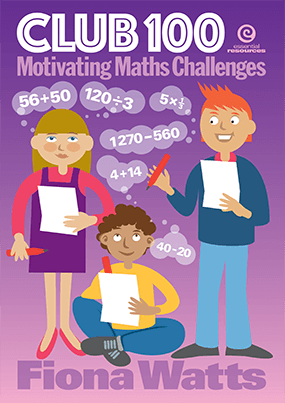
Club 100 Companion is an independent classroom web tool designed to support teachers using Club 100 – Motivating maths challenges by Fiona Watts. The published resource contains the Club 10–100 worksheets, answers and guidance for running Club 100 with students.

Resource: Club 100

Subtitle: Motivating maths challenges

Author: Fiona Watts

Publisher: Essential Resources

Cover of Club 100 – Motivating maths challenges by Fiona Watts

Published resource cover — select to view it at Essential Resources.

Ready for your next session?

Open Club 100 Companion and get started.

Returning teachers can continue with their saved class. New users can create a class and receive a single Access Code for future use.